Flowva · Warehouse management

Know what can ship.
Keep orders moving.

Bring wholesale, shop and online orders together with usable stock, picking, packing and dispatch. The office sees progress; the warehouse follows a clear task.

Your follow-up is with a product and implementation consultant.

For Hong Kong wholesalers and distributors, brands with their own warehouse, and teams handling shop and online fulfilment.

See your warehouse work in the product

See the work in the product.

Order fulfilment, partial receipts and management decisions. Three everyday examples.

01 · Coordinate mixed-channel fulfilment

Wholesalers, distributors and shop / online fulfilment teams

Order channel, picking progress, current stage and dispatch cut-off

Flowva mixed-channel outbound register with store and Shopify orders, picking progress, current stage, carrier and dispatch cut-off
Product interface · sample data
The situation
Wholesale orders, shop replenishment and online orders share the warehouse. The office needs to know which stock can be allocated and which orders are ready for the next stage.
How the work is done
Review usable stock, allocate by the agreed rules and send clear picking work to the warehouse. Keep packing and dispatch progress with the order. For larger volumes, choose wave picking and sorting where needed.
What improves
The team follows order progress and shortages without rebuilding the picture from separate messages.
Look at the detail

The sample register shows store replenishment and Shopify orders together. The mobile view opens SO-91701 with its delivery details, picking stage and item lines.
02 · Receive part of a delivery, keep the rest clear

Receiving staff, purchasing and warehouse supervisors

The situation
A delivery arrives in parts, or goods are short or damaged. Recording only “received” leaves the office to work out what actually arrived and what remains.
How the work is done
Open the receiving task, check the item and confirm actual quantity and location. Keep shortages, rejected goods and other exceptions with the receipt for the agreed inspection, putaway and posting decisions.
What improves
Purchasing and the warehouse follow the received quantity, remaining work and exceptions against the same receipt.
Look at the detail

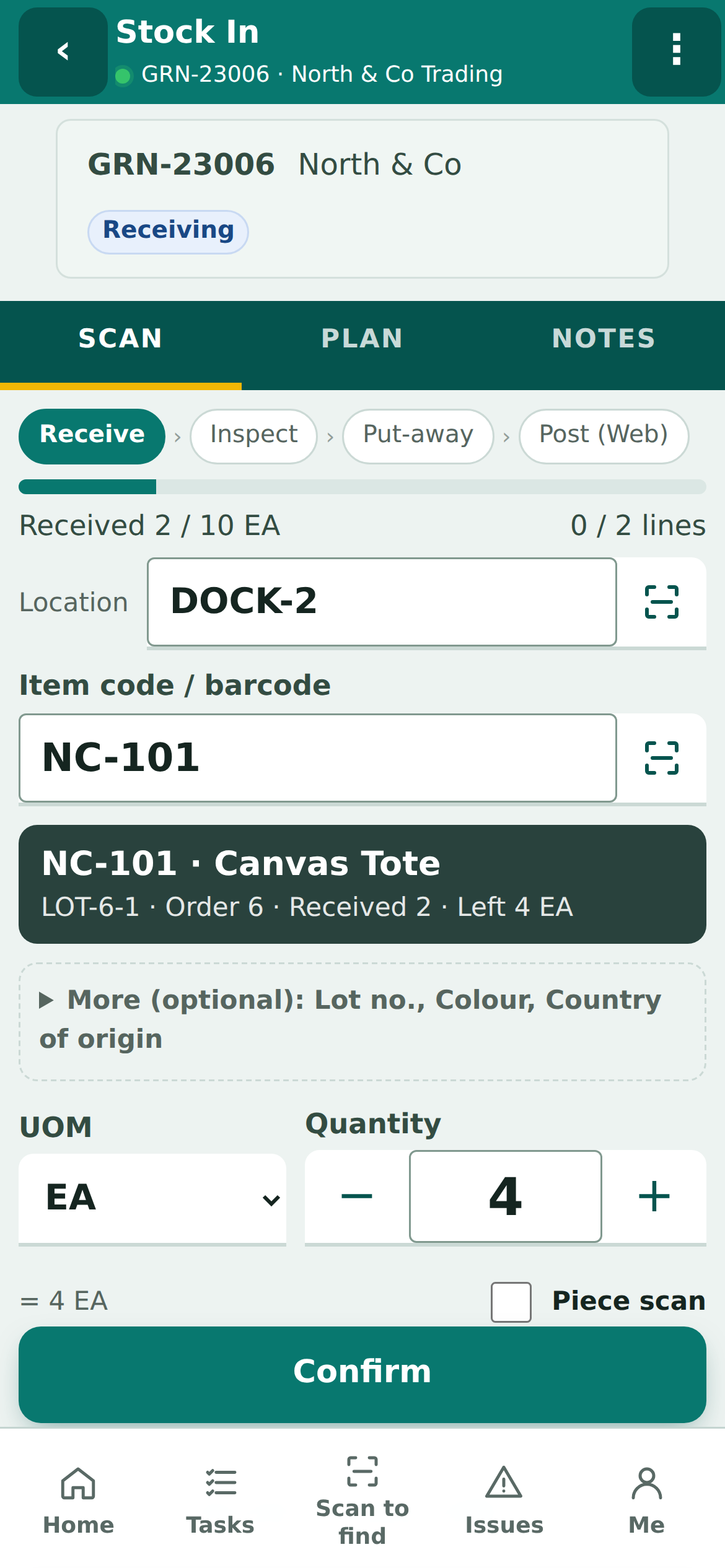
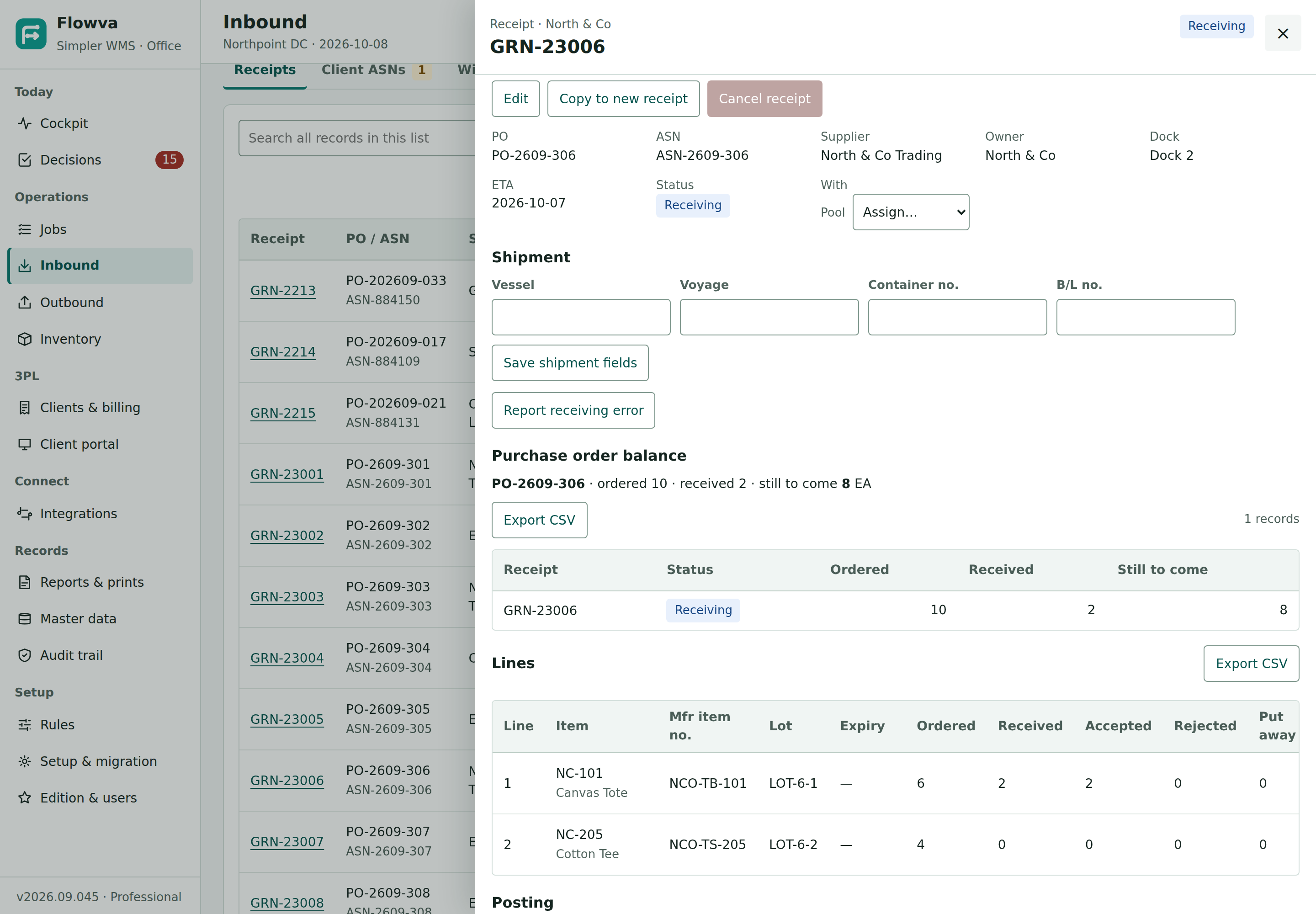
GRN-23006 shows 10 ordered, 2 received and 8 remaining. Scanning identifies the item; the operator confirms the actual quantity in the task.

An actual receiving task with quantity confirmation

Flowva mobile receiving for GRN-23006 showing scanned item NC-101, location and quantity confirmation
Product interface · sample data
See the office record of the same partial receipt
Flowva GRN-23006 office receipt showing 10 ordered, 2 received and 8 remaining, with the item records
Product interface · sample data

03 · See the work that needs a manager’s decision

Warehouse managers and operations supervisors

Today’s warehouse plan and the decisions inbox

Flowva cockpit with warehouse progress, store and online dispatch cut-offs and decisions requiring manager attention
Product interface · sample data
The situation
The manager needs more than a stock total: outstanding jobs, approaching dispatch cut-offs, held goods and differences requiring review.
How the work is done
Use the operations view to follow today’s work and decisions. Open the related record to check a shortage or count difference, then follow the configured recount and approval route. Stock enquiries distinguish available, reserved, held and damaged goods.
What improves
Managers can focus on the job needing attention and use its records to decide the next action.
Look at the detail

The cockpit puts fulfilment cut-offs and a decisions inbox together. Operating figures use sample data.

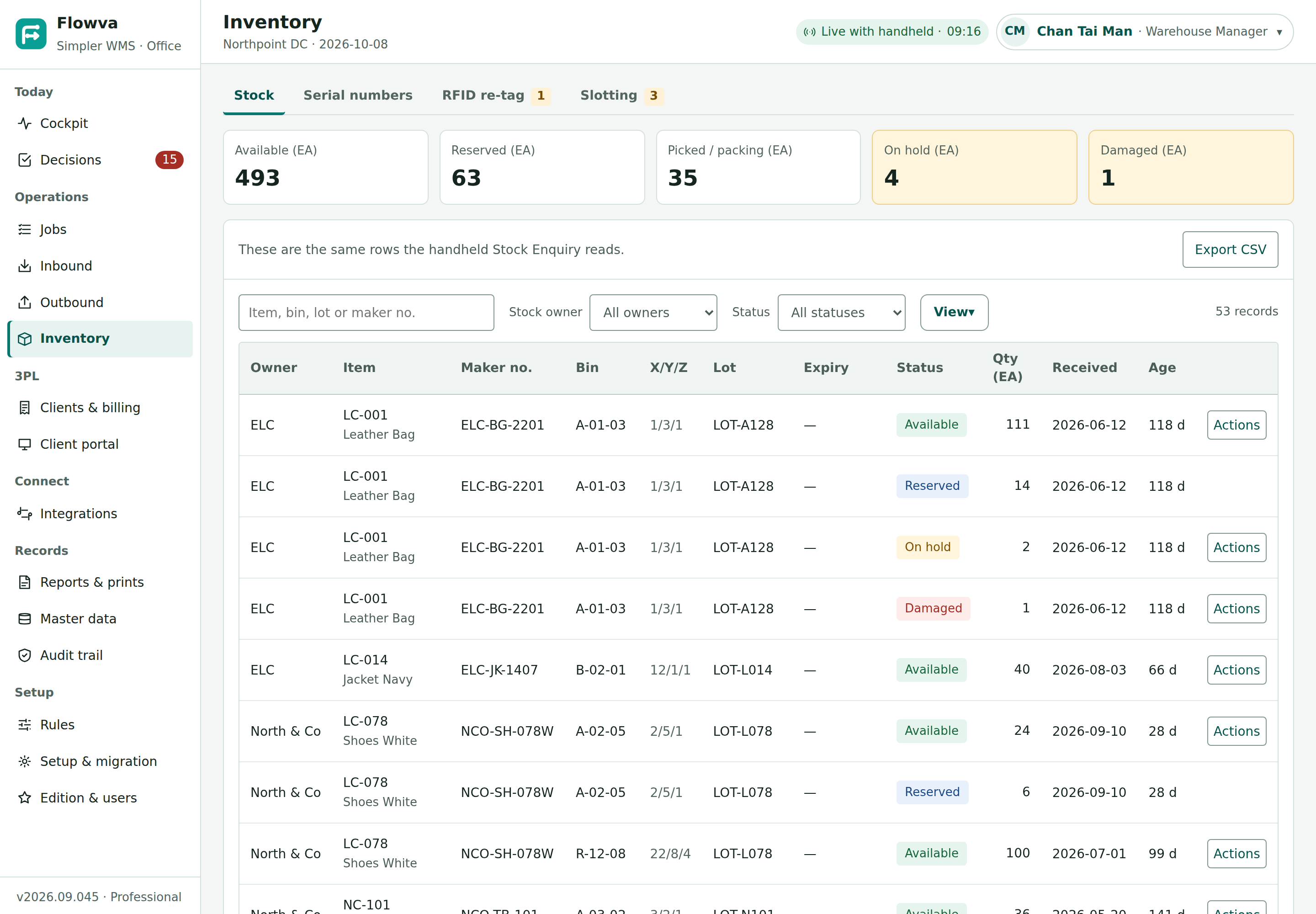
See available, reserved and held stock

The same item and location can have separate available, reserved, on-hold and damaged quantities. A physical stock total alone does not tell the team what can be allocated.

Flowva inventory shows the same item and location with available, reserved, on-hold and damaged quantities, plus lot and expiry details
Product interface · sample data
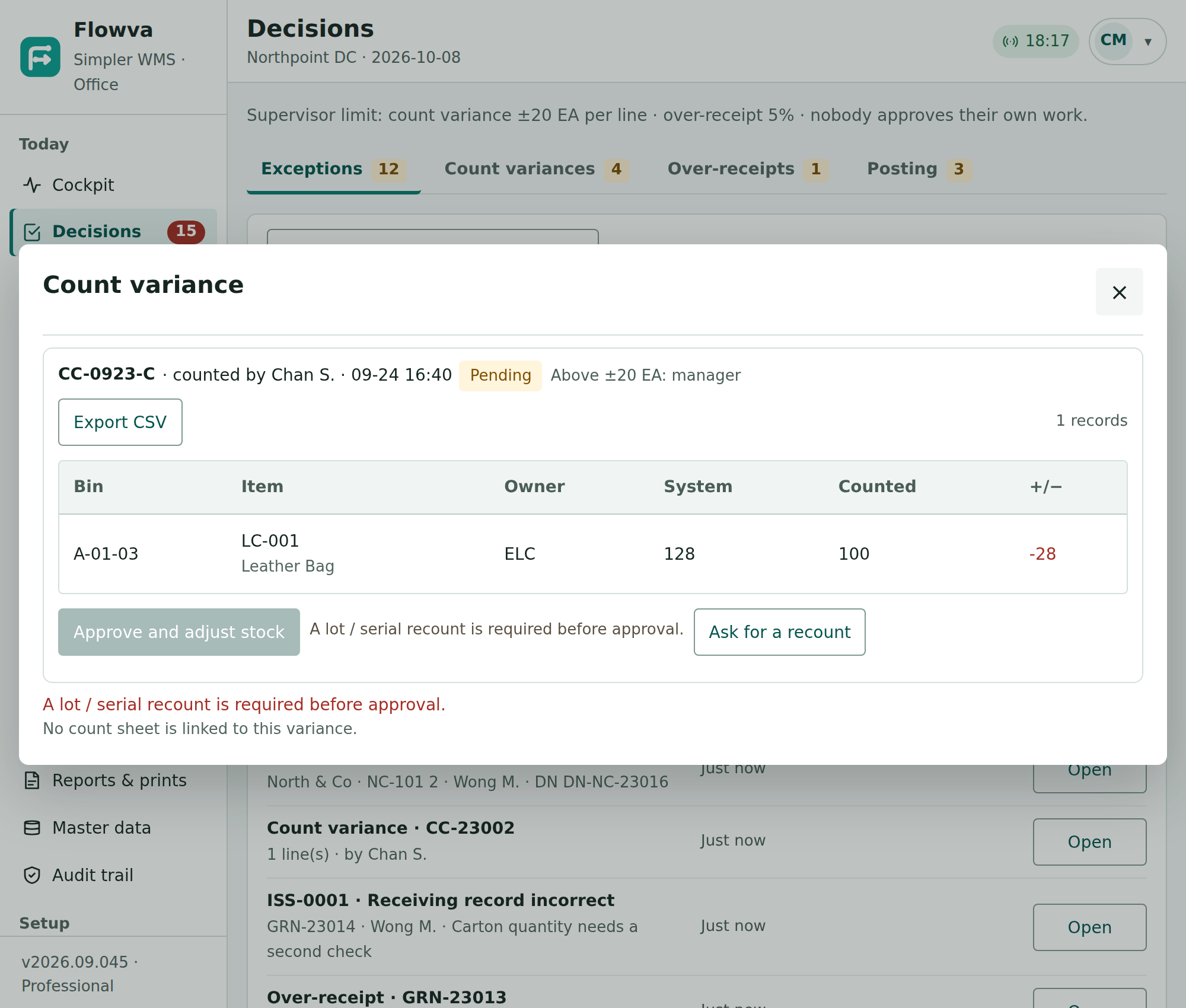
See a count difference and the required next action

The sample record has system quantity 128, counted quantity 100 and a difference of −28. Its review requires a recount before approval.

Flowva count variance record showing system quantity 128, counted quantity 100, difference minus 28 and a required recount before approval
Product interface · sample data
Does this sound familiar?

You have the orders and stock records.
Coordinating the work still takes effort.

Even with an ERP or stock system, the team may still use messages, spreadsheets and calls to decide what can be allocated, what is ready to leave and who should handle a difference.

When stock status and progress differ across records, it is hard to feel confident about the dispatch arrangements you promise a customer.

Warehouse software should fit the work on site, making checking and recording part of the task.

Stock on hand is not always stock you can promise

Some goods are reserved, held or already being packed. The office needs the usable quantity and its status.

Every channel needs the warehouse to coordinate

Wholesale, shop and online orders compete for stock, staff and dispatch time.

A difference creates another round of chasing

Partial deliveries, short picks and count differences need a clear record, owner and next action.

Separate updates make shortages, delays and count differences harder to resolve before they affect the next task.

What improves in daily work

Handle the warehouse detail.
Keep everyday work clear.

The system handles stock status, task handovers and review controls behind a clear working path. Staff capture the useful details while completing the job.

Orders and usable stock together

Distinguish available, reserved and held stock, then follow allocation and fulfilment stages.

Clear tasks for frontline staff

Keep the item, location and quantity with the task. Scan and confirm while doing the work, reducing separate entry and later checking.

Managers see the work needing a decision

Follow outstanding jobs, shortages and stock differences with the record and next responsible person.

A complete flow, with a clear task at each stage

The office sees the whole order.
The warehouse knows the next task.

Plan stock and fulfilment together. Let the warehouse confirm the work as it happens, and route differences to the person who can decide.

  1. 01

    Review stock and allocate

    Check available stock and the order requirements; use the agreed allocation and stock rules.

  2. 02

    Pick against the task

    The task carries the goods, locations and quantities. Scan to check the item, confirm what was picked and record a shortage if needed.

  3. 03

    Check and pack

    Keep carton or pallet contents with the order, including the packing details needed for checking.

  4. 04

    Dispatch and follow the record

    Follow hand-over, shipment and outstanding work. Exceptions remain with the relevant record for review.

When the quantity or condition differs

Record the actual result → review the related order or receipt → agree the next action or required approval. A shortage remains visible as outstanding work.

Use the controls your operation needs

Simple receiving can use an agreed direct stock-in route. Add inspection, putaway, lot / expiry rules or approval only where the workflow requires them. Your consultant walks through the actual task before configuring the route.

The choices behind a simple experience

Choose the equipment and connection
that suit the job.

Once the workflow fits, choose the equipment, network and AI options that help the team perform it. Keep the frontline task clear.

Barcode scanning and RFID options

Barcode scanning reads an item code. RFID uses radio signals to read compatible tags and can capture several tagged items together. Check the readings before confirming stock changes.

Professional handhelds

For frequent scanning, use a compatible handheld with a built-in scanner and scan button. Choose the device for the task and warehouse environment.

iPhone and Android

Use phone-camera barcode scanning or a compatible external scanner. RFID requires a supported integrated or paired reader.

Wi-Fi or 4G / 5G

You can use 4G/5G instead of Wi-Fi when coverage and secure system access are available. A system on your own servers needs a secure remote connection.

Choose the equipment and connectivity that fit your Flowva workflow. Device compatibility and included functions are listed in your proposal. A network connection is required; 4G/5G does not mean offline operation.

Functions that fit your work

Compare the functions
against your everyday needs.

Select the workflows, devices and additional options your warehouse needs. Your consultant confirms the configuration and included functions before quoting.

Your work Functions Everyday value Edition / availability
Fulfil wholesale, shop and online orders Allocation, picking, packing and dispatch stages Follow each order and its next action Warehouse workflow
Find stock and its condition Stock owner/site/location, stock status and traceable quantities Use the stock record across warehouse and office roles Configured stock controls
Receive the right goods Receiving tasks, item scanning and actual quantity confirmation Reduce repeated entry and later reconciliation Warehouse workflow
Coordinate larger outbound work Wave picking, sorting, packing and carton/pallet details Coordinate related tasks and packing records Advanced operations · scope selected for the warehouse
Count and review differences Count tasks, difference records, recount and approval Decide the next action with supporting records Warehouse workflow
Set roles and trace operations Role controls, approvals, audit records and operational reports Keep actions and decisions accountable Configured controls
View the detailed function comparison
Your work Functions Everyday value Edition / availability
Fit the inbound route Direct stock-in or receiving, inspection, putaway and posting Use the checks needed for the job Configured warehouse route
Pick by the agreed stock rules Lot, serial and expiry controls, with first-in-first-out or first-expiry-first-out stock rules Select the relevant stock with a traceable basis Configured item and stock rules
Handle returns and stock movement Returns review, disposition, transfers and replenishment Keep movement and exceptions against the record Configured workflows
Support service-based warehouse work Stock-owner separation, client views and warehouse billing workflows Provide clearer records for service coordination Advanced / third-party warehouse service scope selected separately
Choose scanning equipment iPhone/Android camera, professional barcode handhelds and compatible RFID readers Use equipment that suits the frequency and task Device options · compatibility and integration apply
Work where mobile coverage is available Wi-Fi or mobile 4G/5G with secure system access Choose connectivity around the operating location Network access required; mobile data is an option
See work requiring attention Work boards, progress, differences and optional AI analysis Review the relevant record before deciding AI options · available scope assessed separately
Connect existing business systems Agreed ERP, POS or e-commerce data interfaces Reduce separate data handling where an interface fits Optional integration · separately scoped and quoted

The quotation lists the functions available for your solution, enabled channels, optional work and rollout timing.

Follow one piece of work

From stock allocation to completed dispatch.

See what happens at each step. The included functions are listed in your proposal.

Explore the steps in detail
Step 01

Review stock and allocate

Check available stock and the order requirements; use the agreed allocation and stock rules.

1 / 4
Confirm the right available solution

Know what is included
before you decide.

Choose the Flowva configuration and additional options that fit your warehouse work.

What is included in your solution

Your Flowva proposal lists included functions, compatible equipment, system connections and implementation timing.

Fit your operating environment

Choose where the system runs.
Plan for service interruptions.

Choose cloud hosting or your own servers, then decide whether you need high availability to reduce service interruptions. We assess your IT environment, data needs and budget with you.

Where the system runs

Cloud

Run the system in a cloud hosting environment, with access and support responsibilities agreed in your proposal.

Your own servers / on-premise

Run the system on your own servers, with equipment, access and support fitted to your IT arrangements.

Protection against service interruptions

Standard · non-HA

A standard setup, without a high-availability failover arrangement. Backup and recovery are agreed for your needs.

High availability · HA

High availability (HA) reduces disruption if a system component fails. Your proposal states how the system switches to a backup component and how service is restored.

Your proposal lists the system setup, backup and recovery, required equipment, licences, hosting, maintenance and related fees.

Review deployment and commercial options
A consultant helps you find the fit

Start with the way
your team works.

Your team already has a way of getting things done. We look at who does the task, where checking is needed and what the next person needs to know, then show the product in that context.

We understand that introducing software affects people, habits and daily service. We start with how your team works, then show you the product using that workflow.

A Hong Kong company with local support, from implementation to everyday use.

Established in Hong Kong in 2005, with team qualifications in project management and IT audit.

See our team credentials
01

Show us one real workflow

Meet a product and implementation consultant for a free initial discussion and a relevant product walkthrough.

02

Agree the solution and quote

Confirm the available product, deployment, scope, fees, payment stages and rollout plan before committing.

03

Prepare the team and go live

After the agreed initial payment, we collect requirements, configure the agreed scope, train users and support testing and go-live.

Book a free consultation

Bring one process you would like to make easier.

Fees and implementation

Clear scope.
A quote for your needs.

Choose annual subscription or a one-off on-premise software licence, plus implementation. Your quotation lists the included work, optional customisation, go-live plan and payment stages.

See implementation, fees and billing start

Before you decide

How do we start using Flowva?

Your consultant reviews your order channels, stock rules and warehouse tasks, then confirms the configuration, suitable devices and implementation plan. The product screens use sample data.

Can simple receiving stay simple?

Yes, the design supports an agreed direct stock-in route as well as receiving, optional inspection and putaway controls. We walk through the actual process before choosing the setup.

Do we need new hardware?

We assess the workflow, existing devices and scanning conditions first. Phone-camera scanning, professional scanners and RFID have different operating and compatibility requirements.

How do we start and budget?

Start with one warehouse workflow in a free initial consultation. See whether the product fits, discuss where to run it and identify any additional work. You then receive a proposal and quote for the available solution.

Can we use iPhone, Android and professional handhelds?

The design includes phone-camera scanning, compatible external scanners and professional Android handhelds. RFID uses supported integrated or paired readers. Devices, tags, scanning conditions and integration are verified for the agreed solution.

Is Wi-Fi required?

Wi-Fi is not required if a compatible device has 4G/5G coverage and can connect securely to the system. A system on your own servers needs secure remote access. The device still needs a network connection.

What does the AI insight option do?

Optional AI assistance helps managers interpret warehouse records and investigate differences using data they are allowed to access. It supports decisions; stock changes still follow the required approval process. Your proposal lists the available AI functions and any additional setup.

Take the first step with a consultant

Bring one workflow.
See what could work better.

Book a free initial consultation. See the product using one everyday workflow and receive a one-page recommendation on product suitability and how to start.

Your follow-up is with a product and implementation consultant.

YOUR TAKEAWAY

A clear basis for your next decision

  • Where the standard product fits your work.
  • Configuration, optional customisation or integration needs.
  • Where to run the system, how to reduce interruptions and how to go live.
  • An early budget direction, timing and next step.

Detailed requirements, the functional requirements document and implementation are paid services. They begin after the order is confirmed and the agreed initial payment is received.